






The iPhone is quickly catching up with its MacBook predecessor, thanks to some genius app inventors. But my favorite part about my trusty little gadget is still the convenient layout of the text messaging system. I love how each message pops up right under the previous one in a simple green or gray bubble, just like iChat on my MacBook. But besides streamlining video to your friends, there is one major iChat component missing from the iPhone text messaging system… smiley faces!
About a week ago, a very nice friend of mine emailed me directions to install smiley faces to my iPhone texting system through Max Thrane. As someone who rarely uses most of my downloaded apps I was a little hesitant, but believe it or not this new and free application has made messaging to my other iPhone pals ten times as much fun!
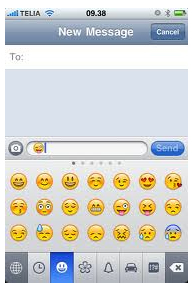
Aside from the pages and pages of classic emotional smiley faces, your iPhone will also be filled with dozens of icons such as hearts, animal faces, flowers, holiday symbols food, accessories and even cocktails — all for your sending pleasure! Oh and don’t worry, it works with any version of the iPhone and you won’t have to leave iPhone Messages to grab an icon. Once smiley faces are enabled and installed, a small button (looks like a globe) will be added to your keyboard for easy icon access.
How to install:
- Install Spell Number
- Launch Spell Number on your iPhone
- Enter this number: 91929394.59
- Press Return button on your keyboard
- Exit the application (by pressing the Home button at the bottom of your iPhone
- Open Settings
- Go to General
- Go to International
- Press Keyboards
- Scroll down to Japanese and press it
- Flick the on/off switch for “Emoji” to the left (ON position)
Now you are ready to start sending colorful icons… enjoy!
Original instructions are located at Max Thrane.
* New: Also check out How To Add Emoji on iPhone





So fun!! I’m installing it right now!
I think smileys are the greatest add-on to any conversation, especially since you really don’t know the tone of the person on the other end;)
Haha this is one thing iphone needed to catch up on…like 10 years after AOL.
yay! about time!
Screw iPhones. Blackberries are the best.
Love this app and forget blackberries they aren’t even touch screen!!!
Thank u so much I’ve been wondering how to get them and I deff. Wouldn’t of found that on my own!!!!
The iPhones the truth blackberry is okay only cuz it has a messanger….!
this is so cool i was always wanting to figure out how to put smiles in my text bubbles 🙂
Thank you so very much. I was skeptical, but it works. Neat!
THIS THIS AWESOME!!! IT DOES WORK! THANKS
I did not have to download this app I just had to do the last steps. I had turn off the settings as I did not want any Kanji options when I text
After forty-two years my hindbrain still leaps to attention at the sight of a good Lope. ,
Great app.. Thanks
it works on my phone but the people i send text to cant see it so what good is it
It does work I sent them to 8 of my friends all but 1 got it and she
has a blackberry…. So ya blkbery does suck….
o FYI the face is the app to if u can see it.
Black berrys are way better than iphones my bff had an I phone and gave it back 3 hours after she bought it cuzz it don’t work
Is this download even free. And btw iphones aren’t better than blackberrys blackberrys have more apps.
yes this app is free and what happnes if i delete it? my bro was texting me these awesome icons and i got jealous and i found this site in just a few inutes and i was able to text my bro that i got the app thing!!!! this is awesome! they should add these at regular. i still dont get the japanese part lolz..
Do these show up on flip / regular cell phones when you text the smileys to them?
Only iphones
This is friggen awesome!!! FANX!!
about time, that’s for sure!!
Helpful hint: If you are running iOS 4 or later, the following revised steps might help you:
1. You may or may not need to enable the Emoji keyboard, I’m not sure.
2. Make sure your Messages app is closed (press the Home button twice, and hold down on the Messages icon if it is in your recent apps panel down the bottom, until you can tap the – icon in the circle to close it).
3. Go to Settings -> General -> Keyboard -> International Keyboards -> Add New Keyboard… and select the “Emoji” one (not the Japanese Emoji one which doesn’t appear to be there in iOS 4).
Now when you restart the Messages app, the Globe icon will be available to toggle between the English and Emoji modes. Good luck!
Do you any links that I download to change the fronts of my text message? Please let me know.
I have followed the instructions, but I am not getting anything the globe icon. I downloaded spell number and launched it and input the number and hit the return button (Nothing seemed to happen). I then went to general, settings, international, keyboards and added the ’emoji’ keyboard. I then re-opened messages and nothing….so what am I doing wrong ??
Just decided to switch off phone and re-start….and hey presto it’s there…..so if anyone encounters a problem, just switch the phone off and then back on (As in reboot !!).
this does not work on my Iphone . I tried shutting it off and on. there is 2 japanese choices on my phone and I cannot do step 11 there is no on and off switch.
i downloaded this app not realizing only people with iphones could view the icons. is there another app that is user friendly to all phones not just iphones
I have the iPhone 3GS and the install directions didn’t work on my phone. After I put the number in and hit return it still only gas one choice in my international keyboard list and that’s English. Can someone help me?
Don’t be stupid, this app is a farce. All you need to do to use the smileys is enable the emoji keyboard. The app itself is probably some kind of adware used by companies to track your phone activity, probably for marketing purposes
It didnt work and I have the iPhone 4!!
It has romaji. And that’s it
All I saw was Romaji as well. I have an iPhone3. What’s this Emoji your talking about?
IT WORKED ON IPHoNE 4!
I did what Greg say in post 22. And it worked perfecty.. I’m havin a blast with these Lil icons… Thanks!
Thanks Greg, that really helped. I couldnt figure out why it wasnt working
how do you fix iphone so that you can see smiley faces sent from a blackberry